
Quick Overview (TL;DR)
If you’re an estate planning or elder law attorney, your clients didn’t “hire” your scheduling tool, client portal, e-signature platform, or payment processor—they hired you. But when third-party emails and texts show up with confusing sender names, generic language, or mismatched branding, clients can feel uncertain, skeptical, or even suspicious. That confusion quietly drains trust (and slows down scheduling, document signing, and fee payment).
This post helps you identify where third-party communications may show up in law firms, why it matters so much in estate planning and elder law, and provides a simple checklist to make every client touchpoint feel clear, consistent, and truly you.
It's Marketing Pet Peeve Time (and Yes, I Have a Lot of Them)
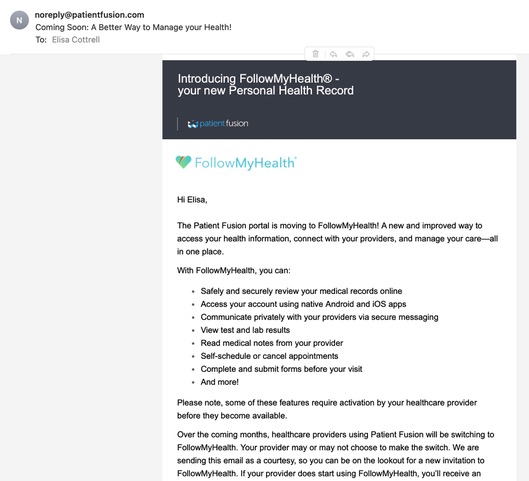
I got an email the other day from a company I didn’t recognize—connected to a doctor’s office I couldn’t remember—telling me they were changing their name… to another name I recognized even less.
And my honest reaction as a busy human was:
Who the heck are you? And why should I care that you’re changing your name?
Because here’s the thing: my life is too short and too busy to untangle your branding for you. If I have to pause and think:
“Which doctor’s office is this connected to?”
“Is this spam?”
“Why are they asking me to do something?”
… I’m deleting your message because you’re making me think too hard.
And that’s when, as a legal marketing consultant, I thought: “Okay, but that’s healthcare. Attorneys aren’t doing that, right?”
Not so fast. (As Lee Corso would say.)
Most estate planning and elder law firms absolutely have third‑party tools touching client communications—even if it doesn’t seem like they reach out to clients directly like in our medical portal example from real life.
The Real Issue: Your Client Hired You—Not Your Technology
In estate planning and elder law, clients often come to you in one (or more) of these states:
- overwhelmed
- nervous
- embarrassed
- grieving
- scared of making a costly mistake
- intimidated by legal language (or by attorneys, period)
So, when they receive a generic email or text with language like:
“Document Signature Requested”
“Your Appointment Has Been Scheduled”
“Payment Receipt”
“Please upload your files”
… with no obvious connection to your firm, you’ve introduced friction at the exact moment you need instant clarity.
Even if the tool is legitimate, the experience can feel sketchy.
And in this day and age, where it seems like everyone is out to get someone through spamming and phishing, this can wreck the client experience. When people feel uncertain, they delay. When they delay, they don’t sign or do their homework. They don’t show, or they cancel altogether. They don’t move forward on creating a plan that could save their family immense heartache.
All because of a disconnect between technology and client experience.
Where This Shows Up in Estate Planning & Elder Law Firms
Even if you never intentionally let a third-party vendor “talk to your clients,” these tools often do, either by default or oversight:
- 1) Intake & Scheduling Systems (ex: Lawmatics): confirmation emails, reminders, intake links, etc.
- 2) E-signature (ex: DocuSign): “Signature Requested” emails, reminders, “final copy” notices, etc.
- 3) Invoices & Payment Links: receipts, “invoice ready,” failed payment notices
None of these tools are inherently “bad.” In fact, many are genuinely helpful to the firms who use them. But if they aren’t configured thoughtfully – with your clients in mind – they can create a client experience that feels like:
“I thought I was working with a law firm I could trust… why am I getting emails from strangers?”
Or worse:
“Wait… who is this and what do they want me to click?”
And in estate planning and elder law, that moment of hesitation is expensive.
Your clients have already taken a big step by reaching out for planning. They’re trying to do the right thing for their family. The last thing you want is for a confusing vendor email, a generic portal notification, or an unclear signature request to become the reason they stall out and don’t finish the work.
Put simply: client experience should come first. Your technology should support that – not compete with it.
Why This Matters More in Estate Planning and Elder Law Than Almost Anywhere Else
In a lot of industries, confusion is annoying.
In estate planning and elder law, confusion is a trust issue.
Your work isn’t transactional. It’s personal.
Clients are sharing sensitive information with you:
- family dynamics
- medical realities
- financial details
- fears they don’t even like saying out loud
So, when your communications feel inconsistent or confusing, the client’s brain doesn’t go, “Ah yes, a workflow automation!”
It goes:
“Is this legit?”
“Did I pick the right firm?”
“Am I being scammed?”
“What if I mess this up?”
And then they pause. And in estate planning and elder law, that pause can easily turn into another month… or another year of procrastination. Your clients deserve a clear, confident experience from start to finish.
The Simple Fix: Make Every Message Feel Like It Came From Your Firm
Here’s a practical checklist for you to use. You don’t need to rebuild your whole tech stack—you just need to audit your touchpoints.
The Client Communication Checklist (for Attorneys)
- 1) Does the sender name pass the “recognition test”?
Check every third-party service you use to make sure your name and branding comes through loud and clear. - Think: help@EdwardsGroupEstatePlanning.com
Not: noreply@randomvendor.com (as the primary identity) - 2) Does the first line of the communication answer: “Why am I getting this?”
Example:
“Hi Jane—this is an automated reminder from [Firm Name] about your upcoming appointment on…” - 3) Does the message clearly state the relationship?
If a tool must show its own name, add language that makes the connection unmistakable:
“Sent on behalf of [Firm Name]. If you have any questions, call us at…” - 4) Is the subject line in real everyday English?
“Please sign your estate planning documents” beats “Signature request.” - 5) Is the branding consistent (logo + tone)?
Even simple consistency helps: logo, colors, signature line, and a human closing should be consistent across your firm and across the tech platforms you use. - 6) Does the “reply-to” go somewhere useful?
Clients shouldn’t feel stuck in “do-not-reply” purgatory. - 7) Do you have an “if this looks unfamiliar” safety line?
This builds trust instantly:
“If anything about this email looks unfamiliar, please call our office at ___ before clicking any links.”That one line can prevent confusion and protect your client.
How to Do a Simple DIY Audit
You don’t need a fancy tool to get started. Grab a sheet of paper (or open a blank document) and make three columns:
- 1) Tool/Platform (e.g., Lawmatics, DocuSign, your portal, payment system)
- 2) Type of Message (e.g., appointment confirmation, intake form link, signature request, invoice, payment receipt)
- 3) Notes (from the 7-Question Checklist below)
Now, to conduct the Third Party Audit, follow these steps:
List every third-party platform that might be sending something directly to your clients (or on your behalf):
- intake/scheduling
- e-signature
- client portal/secure messaging
- billing/payments
- review requests
Under each tool, jot down the actual messages a client might see. For example: subject lines or first lines like…
“Signature request”
“Your appointment has been scheduled”
“Invoice ready”
For each message, quickly run through the 7 questions from the checklist above:
- 1) Does the sender name pass the recognition test?
- 2) Does the first line clearly say why they’re getting this?
- 3) Does the message state the relationship to your firm?
- 4) Is the subject line real everyday English (or does it sound robotic/legalese)?
- 5) Is the branding (logo, tone, signature) consistent with your firm?
- 6) Does the reply-to go somewhere useful?
- 7) Do you have an “if this looks unfamiliar” safety line?
In your Notes column, just mark what needs attention:
“Good as is”
“Sender name confusing”
“Subject too generic”
“No safety line,” etc.
Then, start by fixing the 1–2 messages that feel the most “stranger-danger.”
Be sure to update:
- the sender name (so it clearly sounds like your firm),
- the first line (so it explains the “why”), or
- the subject line (so it reads like a human from your office, not a vendor).
Bonus: This Is Not Just a “Marketing” Thing
I’ll say it plainly: this is client service.
Because when your communications are clear and recognizable, you reduce:
- no-shows
- delays in getting forms back
- incomplete intake
- slow document signing
- payment confusion
And you increase:
- trust
- follow-through
- client confidence
- smoother workflows for your team
- future referrals (because the experience felt clear and professional)
Clear communication is not fluff. It’s critical. And it can really make you stand out in this day and age, where so many businesses just have their third-party tools on autopilot without truly understanding the impact on the humans interacting with their brand on a daily basis.
If You Want Help Tightening This Up…
If you’re reading this and thinking, “Oof…we probably have a few emails that feel like mystery meat,” you’re not alone.
Start by picking one client touchpoint to audit this week:
- scheduling confirmations
- e‑signature requests
- portal notifications
- payment receipts
Fix the biggest confusion point first. Then move on to the next. (Do one per week or one per month. Just chip away at it.)
If you’d rather have a second set of eyes on your automated emails and client-journey messaging, this is the kind of thing we help firms clean up! We are passionate about client experience. You are serving real people with real problems. Your system should create more problems. It should solve them. Schedule a Discovery Call today if you’d like to chat!